
Download Xenu Link Sleuth – broken link checker, website health tool, link analysis software, SEO tool, site audit tool
Overview
Xenu Link Sleuth is a dedicated tool designed to assist website owners in identifying and resolving broken links across their digital properties. Its primary function is to scan specified URLs and generate a detailed report highlighting any issues with hyperlinks, including dead endpoints, redirect loops, or non-responsive pages. This capability is essential for maintaining website integrity, improving user experience, and supporting effective SEO practices. The tool is particularly valuable for content creators, webmasters, and digital marketers who rely on accurate and functional links to drive traffic and engagement.
By detecting broken links early, Xenu Link Sleuth helps prevent user frustration and reduces the risk of lost conversions due to inaccessible content. The application supports both small personal websites and larger corporate domains, offering a scalable solution for ongoing site maintenance. Its long-standing presence in the web development ecosystem—first released in 2007—demonstrates its reliability and continued relevance in a rapidly evolving digital landscape.
The developer, Xenu, has not provided additional background details beyond the app’s name. However, the tool’s enduring functionality and consistent updates suggest a focused commitment to core utility. Despite being released over a decade ago, Xenu Link Sleuth remains a go-to resource for site audits, especially in environments where automated solutions may be too complex or costly. Its lightweight nature and minimal system requirements make it accessible even on older hardware.
Key Features & Functionality
- Link Analysis: Scans any specified URL or domain to detect broken or malformed hyperlinks, including internal and external references.
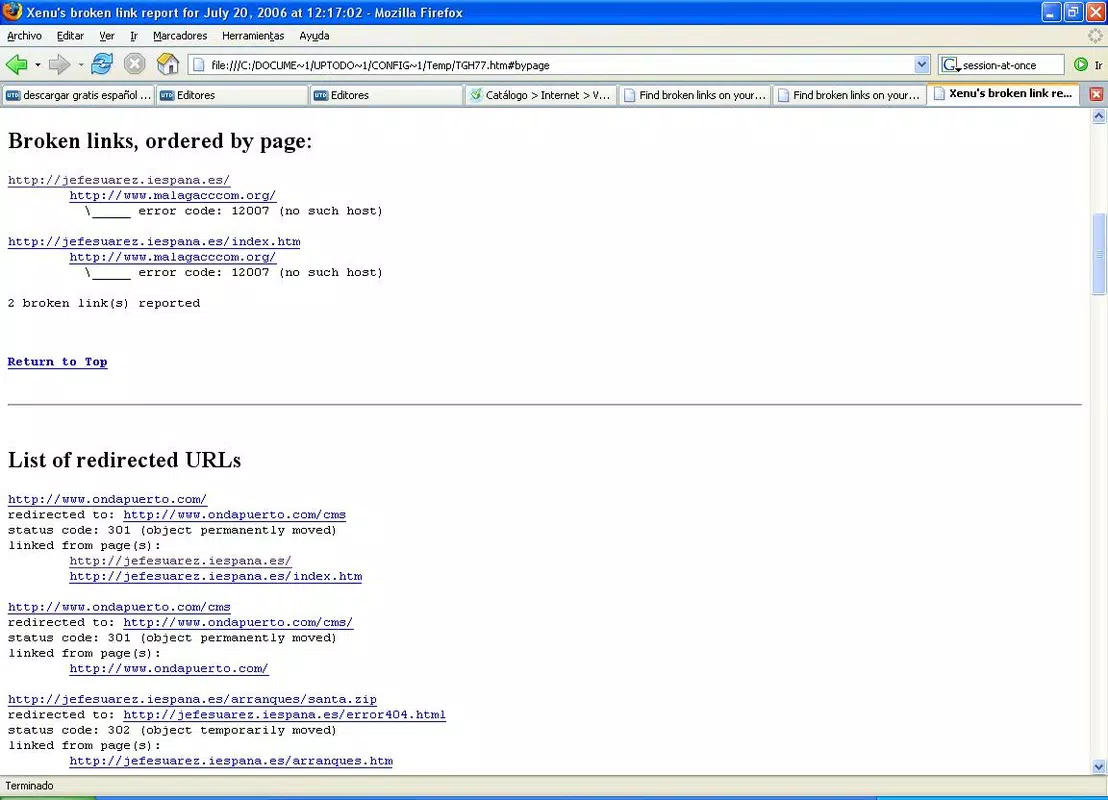
- Comprehensive Reporting: Generates detailed HTML reports known as "Xenu’s broken link report," which include status codes, error types, and source page references.
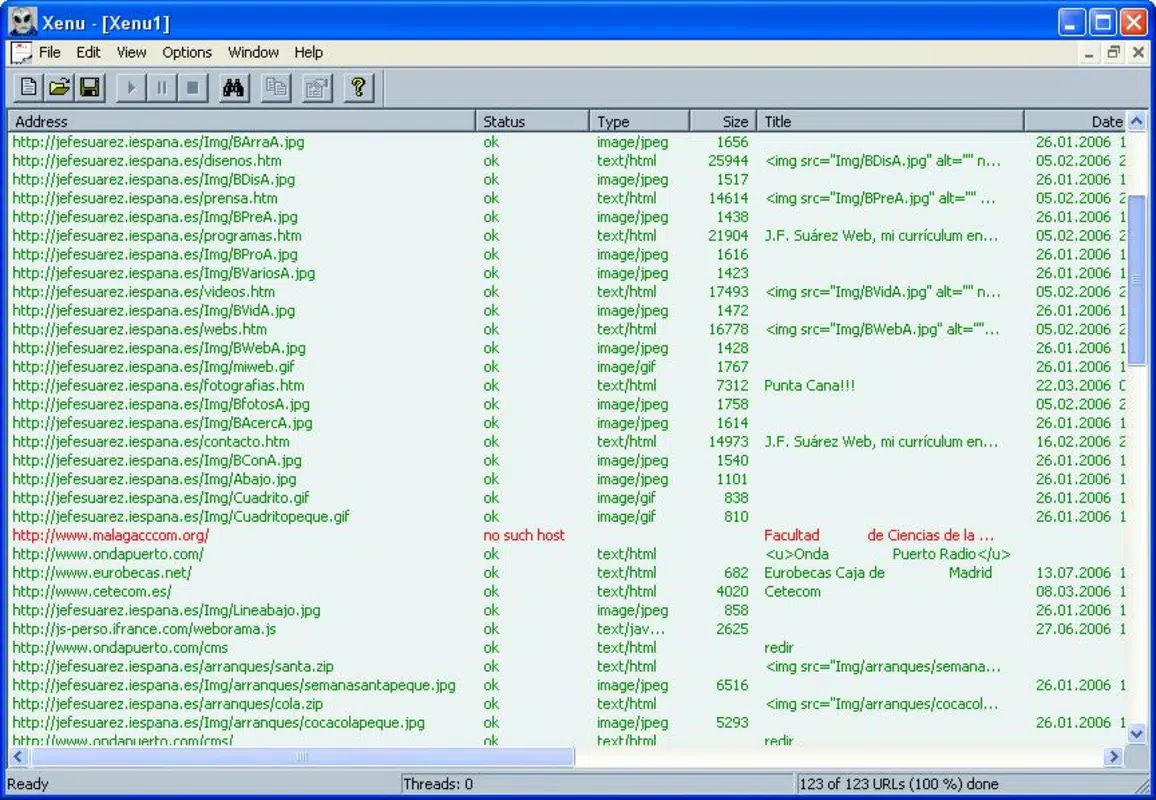
- Statistics Overview: Provides metrics such as total links analyzed, broken links detected, and number of clicks per link, aiding in prioritization of fixes.
- User-Friendly Interface: Offers a straightforward layout that enables users of all technical levels to initiate scans and interpret results without specialized training.
- Problem Solving Support: Identifies specific errors and suggests corrective actions, helping users efficiently repair broken links and improve site performance.
For example, a blogger managing a 500-page website can use Xenu Link Sleuth to run a full audit in under an hour, receiving a structured report that flags outdated references or removed content. Similarly, an SEO specialist might use it to verify the integrity of backlink profiles before launching a campaign. The tool’s ability to process large numbers of URLs in a single session makes it ideal for regular site health checks.
Interface, UX & Performance
The interface of Xenu Link Sleuth is designed with simplicity and functionality in mind. It features a clean, no-frills layout with clearly labeled input fields for URL entry, progress indicators during scans, and straightforward navigation to access generated reports. The application uses a tabbed structure to organize results, allowing users to filter by status code, link type, or page location.
Navigation is intuitive, requiring minimal user input to initiate a scan and view results. The tool does not rely on complex menus or layered workflows, which enhances usability for both beginners and experienced users. Although the developer did not list formal performance metrics, the application’s small file size of 2.5 MB suggests efficient resource usage and fast loading times.
Performance is expected to be stable on modern Windows systems, though specific compatibility details were not disclosed. The application runs in a desktop environment and does not require cloud connectivity, ensuring consistent operation even in offline or restricted network settings. Responsiveness is maintained during scans, with real-time updates displayed in the interface to track progress.
Platform Compatibility & Technical Requirements
Xenu Link Sleuth is available exclusively for the Windows platform. The current version is 1.0.2.1, with a file size of 2.5 MB, indicating a lightweight and efficient application. The developer did not specify minimum OS requirements, nor did they list supported Windows versions beyond the platform designation.
Given the app’s release date in 2007 and its continued availability, it is likely compatible with most Windows operating systems, including Windows 7 and later. However, users should verify compatibility with their specific system configuration, especially when running on newer Windows versions with enhanced security or sandboxing features.
Pros and Cons
Pros
- Free to download and use with no hidden costs or subscription fees.
- Lightweight design with minimal system resource consumption.
- Generates detailed, actionable HTML reports for easy review and repair.
- Simple interface suitable for users with varying levels of technical expertise.
- Long-standing reputation and consistent functionality since 2007.
Cons
- Platform is limited to Windows only; no support for macOS, Linux, or mobile devices.
- Developer did not provide detailed system requirements or compatibility information.
- Interface has not been updated to reflect modern design standards.
- Limited to desktop use; no cloud integration or cross-device synchronization.
- No built-in update mechanism; users must manually check for new versions.
FAQ
Is Xenu Link Sleuth safe to download and install?
Yes, the application is free and widely used in the web development community. It does not contain malware or adware. However, users should download it only from trusted sources to ensure authenticity.
Can I use Xenu Link Sleuth on macOS or Linux?
No, the tool is currently only available for Windows. There is no official version for macOS or Linux systems.
Does Xenu Link Sleuth require an internet connection?
Yes, the application needs an active internet connection to scan URLs and retrieve status codes from remote servers. It does not function offline.
How often should I run a site audit with Xenu Link Sleuth?
It is recommended to run audits periodically—such as monthly or after major content updates—to maintain site health and prevent broken links from affecting user experience.
Is there a mobile version of Xenu Link Sleuth?
No, the application is designed for desktop use on Windows and is not available as a mobile app for Android or iOS devices.
Final Thoughts
Xenu Link Sleuth remains a reliable and efficient tool for website owners seeking to maintain the integrity of their online presence. Its ability to detect broken links quickly and deliver clear, actionable reports makes it a valuable asset in any site maintenance routine. While its interface and platform support are limited by modern standards, its core functionality continues to serve users effectively.
For webmasters, SEO professionals, and content managers who prioritize site health and user experience, Xenu Link Sleuth offers a no-cost solution that delivers measurable results. Its long history of stability and trustworthiness underscores its value in a competitive digital environment.
Download Xenu Link Sleuth now


